Episode
Scaling up
Questions
- What is an optimal cluster setup?
- What is an optimal job configuration?
- How much does it cost?
Objectives
- Optimize the cluster setup for a full dataset processing.
- Learn about job configuration.
- Get an idea of cost and time need for full-scale processing.
Input data
The optimal cluster configuration depends on the input dataset. Datasets consist of files, and the number of files can vary. Files consist of events, and the number of events can vary.
In practical terms, the input to the parallel processing steps is a list of files to be processed. We do not consider directing events from one file to different processing steps. It could be done, but would require a filtering list as an input to the processing.
In an ideal case, the parallel steps should take the same amount of time to complete. That would guarantee that the resources are used efficiently so that no idle nodes - for which we still pay for - remain while the longer jobs still continue. However, this is usually not the case because
- input files are not equal in size
- processing time per events can vary.
The best approach remains to have the same amount of files in each parallel step. Eventually, the files could be sorted according to their size and their share to the nodes could be optimized.
Cluster and job configuration
vCPUs, memory and disk
In earlier investigations on Google Cloud Platform, kubectl top node and kubectl top pods were used to evaluate the resources needs for the processing - the most demanding step in the workflow chain. These earlier estimates were used.
You can install the Kubernetes Metrics Server needed to run kubectl top commands following the instructions on the Metrics Server documentation page.
Note that you will need to download components.yaml locally, and add --kubelet-insecure-tls to the args of the containers in the deployment part of the file so that it becomes:
    spec:
      containers:
      - args:
        - --cert-dir=/tmp
        - --secure-port=10250
        - --kubelet-preferred-address-types=InternalIP,ExternalIP,Hostname
        - --kubelet-use-node-status-port
        - --metric-resolution=15s
        - --kubelet-insecure-tls
Then do:
kubectl apply -f components.yamland wait for the server to start. You can check its state with kubectl get all -n kube-system -l k8s-app=metrics-server.
Without constraints (i.e. other parallel tasks running), the processing jobs take 80% of the available CPU, and require up to 1.8 GB of memory. However, choosing nodes with 4 vCPUs 8 GB memory resulted jobs failing because the node was low on resources. Therefore, nodes with larger memory (16 GB) were chosen.
The output is written to the local disk on the node. For the type of processing in this example - adding information to the usual NanoAOD format - the output size for processing a single MiniAOD file is around 2 GB. The node disk needs to be large enough to accommodate the outputs of all jobs on the node before they are moved to the object storage at the end of the job. It also needs to fit the CMSSW container image which is around 30 GB (uncompressed). Therefore, of the available options, the disk size of 80 GB was chosen. A 50 GB disk could have been large enough, if each job processes a single output file. However, the difference in cost is small, around 10%.
Number of nodes and job configuration
In the example case, we have used the MuonEG MiniAOD dataset with 353 input files. For that number of files, we deployed a cluster with 45 nodes 4-vCPU nodes, providing a total of 180 vCPUs.
We first make sure that the large CMSSW image is present on each node. This is done in a prepull step with an artificial resource request requiring more than half of the available vCPUs, making sure that only one pull happens per node. In this cluster configuration, we require 3 CPUs as the nodes have 4 vCPUs
      resources:
        requests:
          cpu:  "3"
Note that this value needs to be changed is the node has more (or less) than 4 vCPUs.
For the processing, we define a workflow with 353 jobs, and set the resource request so that one job runs on each vCPU at a time. The relevant part of the workflow definition is the resource request of the final processing step:
      resources:
        requests:
          cpu: "800m"
For the processing of the full dataset, this results to running a first set of 180 jobs parallel, and when they complete, the remaining 173 will start. We will have a close to full occupation of the cluster.
Autoscaling
Autoscaling is a feature that automatically removes idle nodes from the cluster. It can reduce cost, as the total cost depends on the uptime of nodes in the cluster. We are not using it, because it would delete the nodes that remain idle while waiting for the prepull step to finish on all nodes. Once the processing step starts, the cluster would automatically scale up to the number of defined nodes. However, in our case, we do not want that happen as the prepulled image on each node is used in the processing step.
Automating
The optimal cluster configuration depends on the number of files in the dataset. One could envisage a tool that
- inspects the dataset(s) to be processed
- creates the cluster with optimal numbers of nodes
- inserts the relevant parameters - the number nodes for the prepull and the number of jobs for the processing - to the workflow definition.
This has not been implemented in this tutorial example to keep it simple.
Costs
The processing over the full example dataset took 8 hours, including setup. The resulting cost of the cluster was 14 CHF. The graph below shows comparison with the earlier work using different cluster configurations and node types on Google Cloud Platform (GCP).
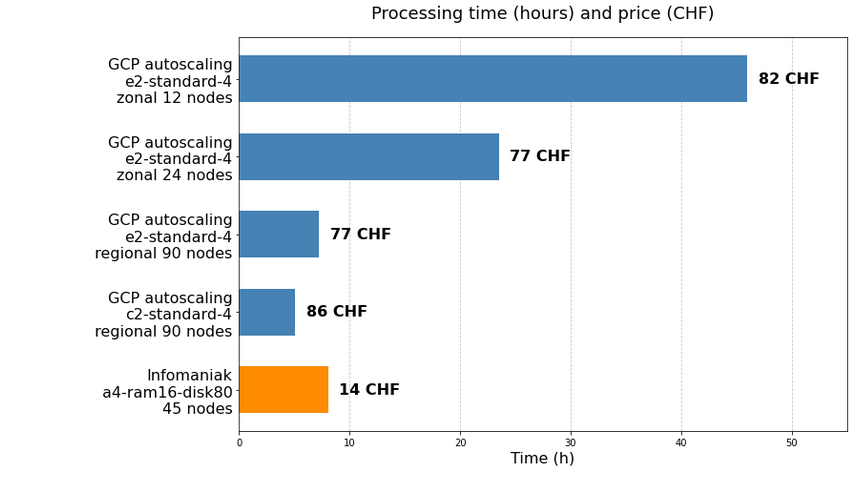
The cost of CMS open Data processing on Infomaniak resources is significantly less expensive than on GCP: it is less than one fifth of the GCP cost. In addition, processing runs faster on similar type of nodes.
Also to be considered, and not shown in the graph: the download from Infomaniak storage is free for the 10 first TB per month and then 0.00811 €/GB. This is to be compared to the Google Cloud Storage download cost of 0.12 USD/GB.
Key Points
- The resource request should be set so that one job runs in one vCPU.
- The optimal number of nodes in a cluster depends on the number of files in the dataset, and it should be chosen so that each job has the same number of files.
- For the benchmarking task of processing an entire CMS dataset, Infomaniak resources were found to be remarkably less expensive than Google Cloud Platform: 14 CHF instead of 77 CHF.